A whole floor plan in a URL: serverless share links, measured at 511 to 834 characters, and what one changed character does
Once the 3D layout tool worked, a common question is: "Can I send this layout to my family?"
The usual answer is to save it on a server and hand out a short link. We did not want that. The tool promises that your files never leave your device, and a server copy breaks that promise. We also did not want a database and accounts just for sharing.
So the share link carries the whole layout inside the URL. When you press "Copy share link", the tool tells you how long the link is:

Why after the #
The part of a URL after # is the fragment. MDN puts it plainly: the fragment is not sent to the server when the URI is requested; the browser processes it.
So a share link looks like /lab/interior-layout/#v=2&s=…. The server only sees /lab/interior-layout/, an ordinary page request. The layout data stays in the two people's browsers the whole time.
The cost is just as clear: the link is the data. We cannot revoke a link once it is sent, and anyone who has it can see the layout. The tool's message says the link holds walls, furniture and style only, not the uploaded plan image.
Step 1: make the JSON small
Inside the tool, layouts use meters as floating-point numbers. Plain JSON would be full of values like 2.6799999. When packing, we change units first:
// Coordinates as integer centimeters, angles in hundredths of a radian, scale in thousandths
const cm = (m: number) => Math.round(m * 100);

const row = [item.type, cm(item.x), cm(item.z), Math.round(item.rotation * 100)];
// Only resized furniture stores two extra numbers
if (item.scaleX !== undefined || item.scaleZ !== undefined) {
    row.push(Math.round((item.scaleX ?? 1) * 1000), Math.round((item.scaleZ ?? 1) * 1000));
}
Field names shrink to one or two letters: k is the layout kind, st the style, f furniture, o the outline, w walls, l room labels, fn floor finishes. Each piece of furniture is an array, not an object, so key names are not repeated.
Step 2: deflate-raw, then base64url
Browsers ship CompressionStream, so no package is needed. We compress with the deflate-raw format and turn the bytes into base64url: A–Z, a–z, 0–9, - and _. It goes into a URL without further escaping.
const deflate = async (text: string) => {
    const stream = new Blob([text]).stream().pipeThrough(new CompressionStream('deflate-raw'));
    return new Uint8Array(await new Response(stream).arrayBuffer());
};

export const encodeShareHash = async (data: SharedLayout) =>
    `v=1&s=${toBase64Url(await deflate(JSON.stringify(packShare(data))))}`;
This is the v=1 code. v=2 adds one more step here, covered later.
We generated one share link for each of the seven templates on the live site and measured every stage. "URL-encoded" is encodeURIComponent on the same JSON, as an uncompressed baseline:
| Template | JSON | URL-encoded | JSON as base64url | deflate-raw | Final URL |
|---|---|---|---|---|---|
| Townhouse ground floor | 639 B | 1,203 chars | 852 chars | 345 B | 511 chars |
| 15-ping 1-bedroom | 713 B | 1,325 chars | 951 chars | 380 B | 558 chars |
| 20-ping 2-bedroom | 868 B | 1,598 chars | 1,158 chars | 439 B | 637 chars |
| 20-ping 3-bedroom | 978 B | 1,802 chars | 1,304 chars | 470 B | 678 chars |
| 25-ping 3-bedroom | 1,043 B | 1,909 chars | 1,391 chars | 490 B | 705 chars |
| 30-ping 3-bedroom | 1,230 B | 2,234 chars | 1,640 chars | 537 B | 767 chars |
| 40-ping 4-bedroom | 1,389 B | 2,515 chars | 1,852 chars | 587 B | 834 chars |
Three things stand out:
1. Plain URL encoding is the longest. Room labels are Chinese. Each Chinese character is 3 bytes and becomes 9 characters once encoded.
2. deflate-raw shrinks the JSON to 42% to 54% of its size. Across the seven templates, larger JSON compressed better. Our guess is that wall and furniture arrays look alike, so more repetition compresses better. We did not test this separately.
3. base64url grows the bytes by 4/3. The 470 bytes of the 20-ping 3-bedroom become 627 characters; with the start of the URL, 678 in total.
v=2 puts a 4-byte checksum before the compressed bytes. That adds 5 to 6 characters to each URL.
The numbers in the table come from Chromium. Compressed output differs by browser. For the same 20-ping 3-bedroom template, the JSON is 978 bytes in both. Chromium 145 compresses it to 470 bytes, WebKit 26.0 to 466. Both decode to the same content, but the link lengths differ by a few characters.
How long is too long?
The HTTP specification, RFC 9110, recommends that all senders and recipients support URIs of at least 8000 octets. That is a recommended minimum, not a maximum.
We cap generated links at 8000 characters. Above that, the tool does not make a link and asks the user to send an "Export JSON" file instead. The longest template is only 834 characters. The cap is for large uploaded plans with many walls.
We did not test whether chat apps cut long URLs. Even so, a cut link never loads halfway. We cut one v=2 link at 8 points, from dropping just the last character to emptying s. All 8 showed "This link is incomplete or was changed". We ran this on a local build in Playwright's WebKit 26.0.
On the receiving side, trust nothing
A share link is data from someone else, and anyone can edit a URL by hand. So every decoding step checks:
1. Only versions 1 and 2 are accepted. Anything else gets "uses another format version". v=2 must also pass a checksum first; see below.
2. If s is over 16000 characters, it is not decompressed at all; the message says the link is too long.
3. Decompression counts bytes as it reads and stops above 256 KB. This blocks a "compression bomb": a small input that expands into a huge output.
4. Array counts are capped (for example, at most 400 pieces of furniture), coordinates must stay within ±1000 m, and only the 13 furniture types the tool knows are accepted.
5. Room labels are only drawn on a canvas, never put into HTML. Even so, control characters, line-separator characters and bidirectional control characters are removed, and labels are cut to 40 characters. Bidirectional controls can make the drawn text read differently from its real content.
If any check fails, the whole layout is rejected; nothing loads halfway. The sending side also decodes its own link first, and never hands out a link it cannot read back.
We tested five broken links on the live site. At the time, the live site still used v=1, so v=2 in row 2 was an unknown version. Now that v=2 is the real format, the same edit shows "This link is incomplete or was changed" (tested on a local build):
| How it was broken | What the page showed |
|---|---|
| Second half cut off | This share link is broken or was changed, so it can't open. |
| v=1 changed to v=2 | This share link uses another format version and can't open here. |
| Characters 21 and 22 replaced with "!" | This share link is broken or was changed, so it can't open. |
| s filled with 16001 characters | This share link is too long to open. Ask the sender to use "Export JSON" instead. |
| One character in the middle changed | This share link is broken or was changed, so it can't open. |
The last row invites a wrong conclusion: "one changed character is always caught". It is not.
One changed character can still open
Common compressed data comes in three wrappers. The zlib format ends with an Adler-32 checksum. gzip ends with a CRC-32. deflate-raw has neither. MDN describes deflate-raw as having no header and no trailing checksum.
Without a checksum, the receiver cannot tell whether the data was changed. Changed data may still be valid deflate, valid UTF-8 and valid JSON, and pass every range check.
We counted. The 20-ping 3-bedroom share link has 627 characters in s. We changed each position once, to the next character in the base64url alphabet, giving 627 new links:
| Result | Links |
|---|---|
| Decompression failed | 146 |
| Output was not valid UTF-8 | 232 |
| Not valid JSON | 169 |
| Valid JSON, failed range checks | 32 |
| Passed, same content as before | 2 |
| Passed, different content | 46 |
579 were rejected. 46, about 7%, would open as a different layout. Of those 46: 16 changed only room labels, 9 only furniture, 5 only walls, 5 only floor finishes, 3 only the style name, and 8 changed several things at once.
The 2 with the same content decompressed to exactly the original. They probably hit unused bits, such as padding in the last character. We did not check each one.
The offline checks are our port of the tool's code, not the live site itself. So we opened 5 of the 46 on the live site. All 5 showed the "Someone shared this layout" banner with no error.
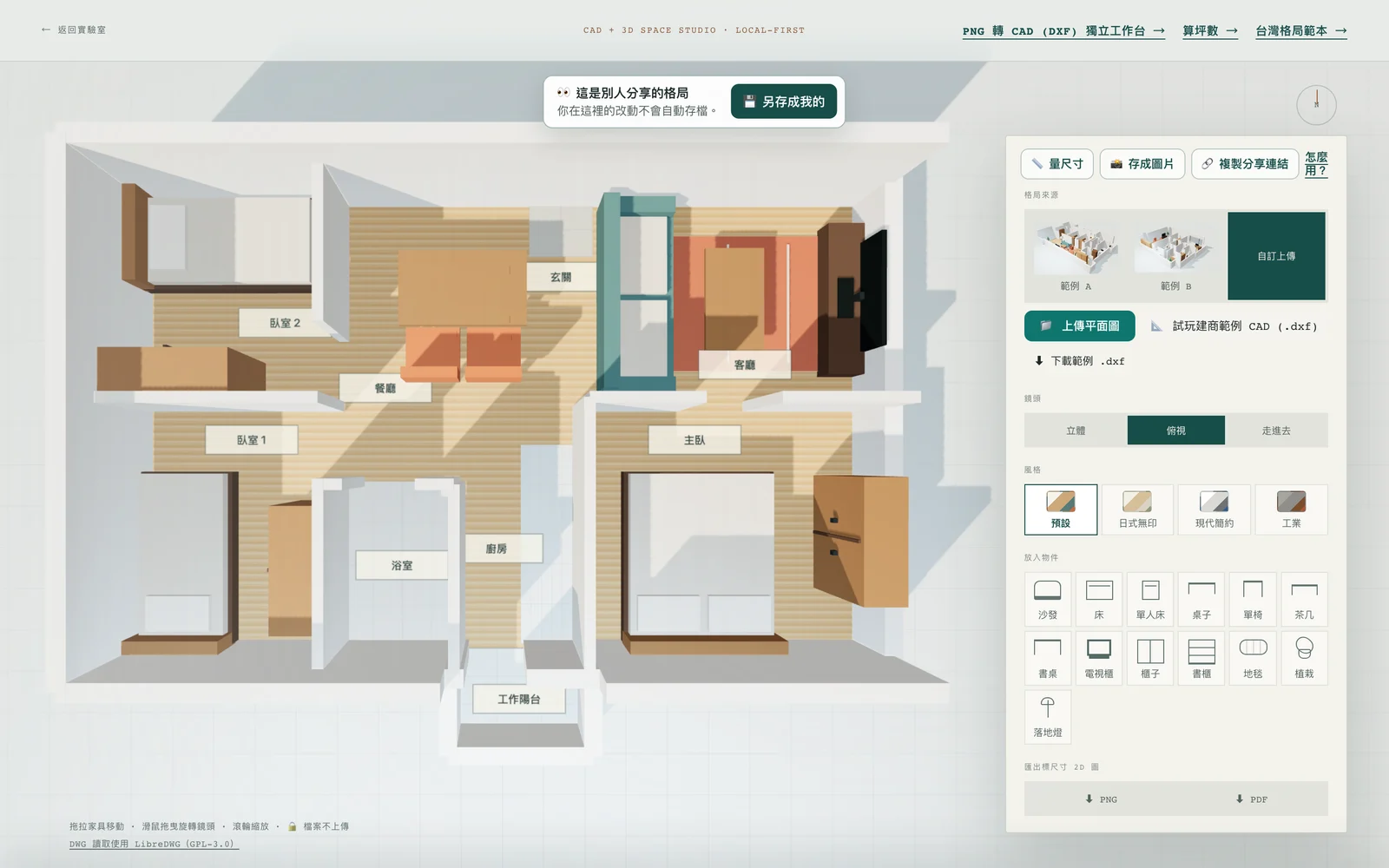
Two details in this picture are worth a closer look.
First, one changed character moved two chairs. Both chairs' data contained the same "273,314" piece. deflate rewrites repeated pieces as "go back N bytes and copy M". Our guess is that the second chair referenced the first chair's piece, so both changed.
Second, 82.73 m is still inside the ±1000 m limit, so the check let it through. Another link moved the same two chairs by just 3 cm, which nobody would notice.
What this means, and what it does not
It is not a security hole. Anyone who wants a different layout can drag furniture in the tool and make a new link; editing the URL gains nothing. The range checks exist to stop crashes and resource exhaustion. All five broken links above were stopped. We did not test a compression bomb this time.
What it does mean: a v=1 share link does not guarantee that what they see is what you sent. If a link is cut off or one character is mistyped on the way, most cases show an error. But about 7% of single-character errors quietly become another layout.
Our fix: v=2 adds a CRC-32
New links are v=2. Four bytes of CRC-32 checksum go before the compressed bytes. On opening, the tool recomputes it first. If it does not match, the page says the link is incomplete or was changed, and nothing loads or decompresses.
We chose CRC-32 because it gives a guarantee for this kind of error. One base64url character carries 6 bits, and CRC-32 always catches a burst error of up to 32 bits. So any one changed character is always rejected.
One small gap remained. The last base64url character can have a few unused bits; changing them decodes to exactly the same bytes. The 2 "same content" links above were probably this kind. v=2 requires the link to be in standard form, so these are rejected too.
Our unit tests take one v=2 link and replace every position with each of the other 63 characters. They also delete one character and insert one extra character at every position. Every variant gets "incomplete or changed".
v=1 links already sent still open, checked by the old rules, without a checksum. Press "Copy share link" again and you get a v=2 link.
CRC-32 only catches accidents, not deliberate forgery: anyone editing the content can recompute the checksum too. Stopping forgery needs a server-side key, which is what we wanted to avoid in the first place.
A Safari-related detail
Compression is asynchronous, so the URL is ready only after a short wait. Some browsers only allow clipboard writes inside the same task as the click. Waiting for compression first may get the write blocked.
Our approach: when the browser has ClipboardItem, we hand the clipboard a Promise of the still-compressing URL at the moment of the click. If the clipboard is blocked anyway, the tool shows the URL on screen for manual copying. The code comment names Safari as the reason. We tried it in Playwright's built-in WebKit 26.0, and the copy succeeded. WebKit is Safari's engine, but this is not Safari itself. In that test setup, a write 300 ms after the click also succeeded, so the block did not show up. We have not checked whether this approach is needed in real Safari or on an iPhone.
Scope of these tests
All v=1 tests ran on 16 October 2026 in headless Chromium against the live site, keeponfirst.com. Safari, Firefox and mobile browsers were not tested.
The v=2 checksum was verified with unit tests. We did not rerun the live-site tests. We also tested copying and cut links on a local build in Playwright's WebKit 26.0, as described above.
The one-character experiment used one template, with a link made in Chromium, and one kind of change per position (the next character). Other replacement characters or browsers may give a different ratio.
To try it yourself, open any template, press "Copy share link", change one character after s= and paste the URL back into the address bar. You will now see "This link is incomplete or was changed".
Open the 3D layout toolSeven Taiwan floor plan templates: each can make a share linkHow this tool turns a floor plan into 3D: Three.js notesTry a bed in the same tool: Taiwan and IKEA sizes differ by 12 cm in lengthPutting data in a URL is convenient: no backend, no accounts. But without a checksum, "it opens" and "it was not changed" are two different things. That is why we added a CRC-32.