Spring Boot 01: how main becomes an HTTP application
Why does opening a URL call a Java method after the terminal prints Started? Building, starting the application, and dispatching HTTP requests are separate steps. This lesson connects them without requiring database knowledge.
Version note: this series is based on Spring Boot 3.5.16 because it targets JBoss EAP 8.1. Boot 4 needs Servlet 6.1, and EAP 8.1 is Servlet 6.0. Spring now offers the newer 4.1. For differences between 3.5 and 4.0, see the Spring Boot 4.0 Migration Guide in the sources.
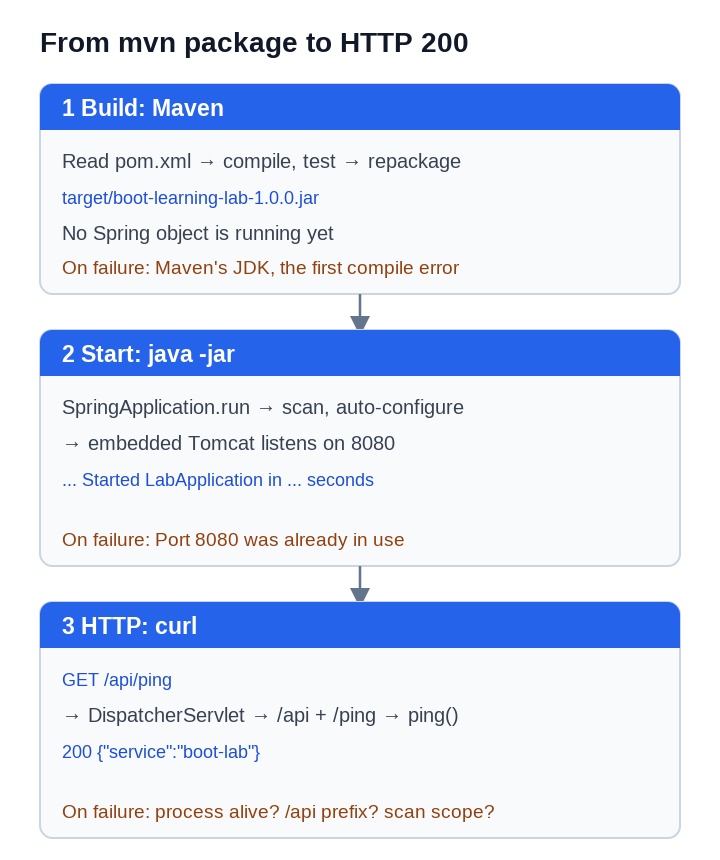
Separate Maven, Spring, and Boot
Maven reads pom.xml to resolve dependencies, compile, test, and package. Spring Framework manages objects and supplies MVC and transaction facilities at runtime. Boot adds integration conventions, auto-configuration, and startup support. Changing dependency versions changes the build inputs; it does not establish correct runtime behavior.
<project xmlns="http://maven.apache.org/POM/4.0.0" xmlns:xsi="http://www.w3.org/2001/XMLSchema-instance" xsi:schemaLocation="http://maven.apache.org/POM/4.0.0 https://maven.apache.org/xsd/maven-4.0.0.xsd">
  <modelVersion>4.0.0</modelVersion>
  <parent><groupId>org.springframework.boot</groupId><artifactId>spring-boot-starter-parent</artifactId><version>3.5.16</version><relativePath/></parent>
  <groupId>com.keeponfirst</groupId><artifactId>boot-learning-lab</artifactId><version>1.0.0</version>
  <properties><java.version>21</java.version></properties>
  <dependencies>
    <dependency><groupId>org.springframework.boot</groupId><artifactId>spring-boot-starter-web</artifactId></dependency>
    <dependency><groupId>org.springframework.boot</groupId><artifactId>spring-boot-starter-validation</artifactId></dependency>
    <dependency><groupId>org.springframework.boot</groupId><artifactId>spring-boot-starter-jdbc</artifactId></dependency>
    <dependency><groupId>com.h2database</groupId><artifactId>h2</artifactId><scope>runtime</scope></dependency>
    <dependency><groupId>org.springframework.boot</groupId><artifactId>spring-boot-starter-test</artifactId><scope>test</scope></dependency>
  </dependencies>
  <build><plugins><plugin><groupId>org.springframework.boot</groupId><artifactId>spring-boot-maven-plugin</artifactId></plugin></plugins></build>
</project>
The parent pins Boot 3.5.16 and java.version selects Java 21. Web supplies MVC and the default embedded server; validation, JDBC, and H2 support later lessons. Test dependencies stay in test scope. Dependency management does not add every library automatically: starters still need declarations. The Boot plugin repackages the executable application.
What this Boot version requires
| Item | Official requirement | This lesson |
|---|---|---|
| Java | At least 17, compatible up to 25 | Fixed at 21 |
| Spring Framework | 6.2.19 or above | Managed by the parent |
| Maven | 3.6.3 or later | Install it yourself |
| Embedded server | Tomcat 10.1 (10.1.25 or later), Jetty 12.0, Undertow 2.3, all Servlet 6.0 | Tomcat from the web starter |
The page also says Boot 3.5 applications can be deployed to any servlet 5.0+ compatible container. Lesson 6 and the EAP series rely on that sentence. This series fixes Java 21, so java -version and mvn -version below should both report 21. If the two commands show different JDKs, fix the environment before reading code.
Find the entry point and scan boundary
// LabApplication.java
package com.keeponfirst.bootlab;

import org.springframework.boot.SpringApplication;
import org.springframework.boot.autoconfigure.SpringBootApplication;
import org.springframework.boot.context.properties.EnableConfigurationProperties;

@SpringBootApplication
@EnableConfigurationProperties(LabProperties.class)
public class LabApplication {
    public static void main(String[] args) {
        SpringApplication.run(LabApplication.class, args);
    }
}
SpringApplication.run creates and starts the application context. @SpringBootApplication combines configuration, scanning, and auto-configuration entry points. This lab keeps its main class and components under com.keeponfirst.bootlab. Moving a controller into an unrelated top-level package can place it outside the default scan.
com
 +- example
     +- myapplication
         +- MyApplication.java
         +- customer
         |   +- CustomerController.java
         +- order
             +- OrderController.java
This is an excerpt of the example on the official “Structuring Your Code” page. The page recommends placing the main class in a root package above other classes, so subpackages fall inside the scan. This lab’s com.keeponfirst.bootlab sits where myapplication does.
main starts one application in a JVM; it does not run again for each HTTP request. This standalone Web application starts an embedded server. An EAP-deployed WAR has a different startup path, which lesson 6 compares.
Read just the ping method
@GetMapping("/ping")
public Map<String, String> ping() {
    return Map.of("service", properties.label());
}
This excerpt belongs to TicketController. Its class-level /api mapping combines with /ping to form /api/ping. @RestController sends the return value through a message converter; the Map becomes JSON. properties.label() currently comes from lab.label in application.properties, explored in lesson 3.
Exercise: start it and inspect HTTP
java -version
mvn -version
mvn package
java -jar target/boot-learning-lab-1.0.0.jar
# In another terminal:
curl -i http://127.0.0.1:8080/api/ping
Download the lab and enter the directory containing pom.xml. Both java and mvn should report JDK 21; resolve a mismatch before building. Expect 200 with {"service":"boot-lab"}. Stop the application with Ctrl+C and repeat the call: the connection should fail, confirming which process served it.
A successful start ends with a log line beginning with Started. In the official getting-started tutorial, the java -jar example output shows this line:
Started MyApplication in 0.497 seconds (process running for 0.651)The tutorial’s main class is MyApplication; this lab’s is LabApplication, and the timings depend on your machine. This line only means stage 2, start, is done. Stage 3 still needs curl.
| Symptom | First check |
|---|---|
| Compilation failure | Maven JDK and first compiler error |
| Port in use | Your previous process or another unused port |
| Connection refused | Running process, address, and port |
| 404 | /api prefix, mapping, component scan |
Failure example: port 8080 is already in use
You can reproduce the second table row yourself: open two terminals and run java -jar in each. The Spring Boot 3.5 source has a class named PortInUseFailureAnalyzer. It turns this case into two pieces of text and fills in the port number. The console prints APPLICATION FAILED TO START, then a Description part and an Action part. With 8080:
Description:

Web server failed to start. Port 8080 was already in use.

Action:

Identify and stop the process that's listening on port 8080 or configure this application to listen on another port.
The first piece states the symptom; the second gives two official ways out: stop the process listening on 8080, or make the application listen on another port. One possible cause of the first is that your previous java -jar is still running. For the second, add --server.port=8081 at startup; command-line arguments override the properties file, as lesson 3 explains.
Do not switch ports just to make the error go away. First check whether the port holder is your own old process. If it is, stop it and rerun, so curl reaches the new artifact.
Check yourself: does editing Java immediately change curl results?
Predict what happens if you edit the ping key but only repeat curl against the running JAR. This lab does not reload that change automatically: stop, package, and start the new artifact. IDE reload and DevTools are separate mechanisms not enabled here. Match the running artifact to the source change before interpreting results.
Download the complete ticket API lab (ZIP)Next: 02: Beans, injection, auto-configuration