Spring Boot 03: trace configuration, profiles, and overrides
You edit application.properties, restart, and still see an unexpected value. Before blaming caching, check command-line arguments, environment variables, and other configuration files. This lesson exposes the effective lab.label through /api/ping so the winning value is observable.
Version note: this series is based on Spring Boot 3.5.16 because it targets JBoss EAP 8.1. Spring now offers the newer 4.1. For differences between 3.5 and 4.0, see the Spring Boot 4.0 Migration Guide in the sources.
Bind configuration to one typed object
// LabProperties.java
package com.keeponfirst.bootlab;

import jakarta.validation.constraints.Max;
import jakarta.validation.constraints.Min;
import jakarta.validation.constraints.NotBlank;
import org.springframework.boot.context.properties.ConfigurationProperties;
import org.springframework.validation.annotation.Validated;

@Validated
@ConfigurationProperties(prefix = "lab")
public record LabProperties(@NotBlank String label,
                            @Min(1) @Max(200) int maxTitleLength) {}
The lab prefix maps label and max-title-length. LabApplication registers this record with @EnableConfigurationProperties so it can be injected. @Validated and the validation starter reject a blank label or a length limit outside 1–200 at startup. Conversion failures should also surface before business requests arrive.
@Value works for a small value; related settings fit a typed @ConfigurationProperties object. Here @Max(200) matches the table’s title capacity while the default business limit is 80. Changing a business setting without checking storage limits can move failures further down the request path.
# application.properties
lab.label=boot-lab
lab.max-title-length=80

# application-local.properties
lab.label=local-profile
A profile selects configuration; it does not detect your environment
local is a name chosen for this example. Activating it loads the matching profile configuration; running in an office does not automatically select a corporate environment. Multiple profiles can be active, so real projects should record startup inputs and configuration sources rather than relying on names alone.
java -jar target/boot-learning-lab-1.0.0.jar --spring.profiles.active=local
# Stop this process before starting the next one.
LAB_LABEL=from-env java -jar target/boot-learning-lab-1.0.0.jar --spring.profiles.active=local
# Stop again.
LAB_LABEL=from-env java -jar target/boot-learning-lab-1.0.0.jar --spring.profiles.active=local --lab.label=from-cli
With no additional sources, the three runs should return local-profile, from-env, and from-cli. For these sources, command-line arguments override environment variables, which override the configuration files. This is a subset of the full precedence rules; test properties and external configuration locations also matter.
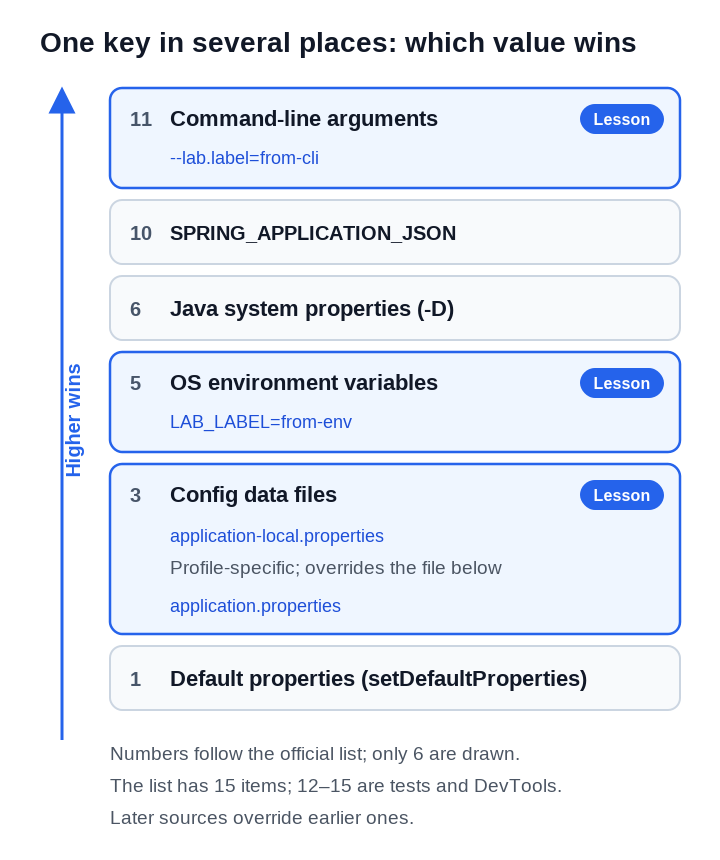
The full official order: later sources override earlier ones
The Spring Boot 3.5 externalized configuration page states that later property sources can override values defined in earlier ones. The official list has 15 items. The table shows the first 11, which ordinary applications meet; items 12–15 are test annotations and DevTools global settings.
| # | Source | This lesson |
|---|---|---|
| 1 | Default properties (SpringApplication.setDefaultProperties) | — |
| 2 | @PropertySource on @Configuration classes | — |
| 3 | Config data (application.properties and similar files) | boot-lab, local-profile |
| 4 | RandomValuePropertySource (random.* only) | — |
| 5 | OS environment variables | LAB_LABEL=from-env |
| 6 | Java system properties | — |
| 7 | JNDI attributes from java:comp/env | — |
| 8 | ServletContext init parameters | — |
| 9 | ServletConfig init parameters | — |
| 10 | SPRING_APPLICATION_JSON | — |
| 11 | Command-line arguments | --lab.label=from-cli |
Item 3 has four layers of its own: application.properties inside the jar, profile-specific files inside the jar, application.properties outside the jar, and profile-specific files outside the jar; later layers win again. Another official sentence says profile-specific files always override non-specific ones. So with local active, local-profile overrides boot-lab.
Item 2 has a trap too. The page warns that @PropertySource sources are added only when the context refreshes, which is too late for settings read earlier, such as logging.* and spring.main.*.
Example: environment variable names drop the dashes
The official conversion rule has three steps: replace dots with underscores, remove dashes, and convert to uppercase. The official example maps spring.main.log-startup-info to SPRING_MAIN_LOGSTARTUPINFO. Note that dashes are removed, not turned into underscores.
# lab.max-title-length → LAB_MAXTITLELENGTH (official rule)
LAB_MAXTITLELENGTH=0 java -jar target/boot-learning-lab-1.0.0.jar
By that rule, the environment variable for lab.max-title-length is LAB_MAXTITLELENGTH. Setting it to 0 should fail startup at @Min(1), just like --lab.max-title-length=0. The official rule is to remove the dashes. Whether any other spelling works, the startup result decides.
Example: a profile-specific file cannot activate profiles
The Profiles page states that spring.profiles.active can only be used in non-profile-specific documents, not in profile-specific files. So spring.profiles.active=local inside application-local.properties is in the wrong place; put it in application.properties, an environment variable, or the command line. spring.profiles.include and spring.profiles.group have the same restriction.
If no profile is active, Boot enables a default profile named default. “No profile specified” is not “no profile.” If the project has application-default.properties, Boot reads it in that case.
Back to the opening question. When a setting does not take effect, ask three things in order. First, where else does the same key appear, and does that source have a higher number? Second, did you convert the environment variable name by the official rule? Third, is the profile really active, and is it activated from an allowed place?
Exercise: predict the final value
Predict the value with local profile, LAB_LABEL=A, and --lab.label=B, then verify with curl. Next start with --lab.max-title-length=0: validation should fail startup instead of silently returning to 80. If the observation differs, first check whether an old process is still answering.
Answer: B, with an explanation of its source
Knowing B is not enough: trace args into Boot’s configuration sources, through LabProperties binding and validation, and into the controller. That path transfers to diagnosing an unexpected URL or timeout in your work application.
Keep database passwords out of downloadable examples and committed files, and avoid dumping all settings into logs. An EAP-managed data source, listener, or pool has its own configuration owner; application.properties does not control every runtime setting.
Download the complete ticket API lab (ZIP)Next: 04: HTTP, validation, error contracts