Build a Claude Code mod: one pane for your AI work queue
What a mod is
A mod is a Claude Code plugin. It uses JavaScript or TypeScript event handlers to change Claude Code's screen and behavior.
The official definition: "A mod is a plugin that changes how Claude Code looks and behaves."
| Item | Detail |
|---|---|
| Launch | 2026-10-01, added in CHANGELOG v2.1.287 |
| Default | The docs say "Mods are on by default" in the terminal from v2.1.287 |
| API status | Still changing. The mods/ README on GitHub says "Early access" and warns the API may change between releases |
| This post targets | Claude Code v2.1.302. Newer releases may need changes |
Two terms first. The official docs separate them the same way:
hook: an event handler inside a mod. For example, "do this when a session starts".
settings hook: the older hook you write in settings.json. It is a different feature. In this post, "hook" always means the first kind.
Agent View watches processes; this mod watches work
Claude Code already has Agent View (claude agents). It lists background sessions on one machine. You see which session runs and which waits for your reply. The docs label it a research preview.
Agent View watches processes. I want to watch work: which tasks a lane ran today and which one failed; which questions wait for my decision and what the asker recommends.
This information does not depend on a live process. Tasks can come from claude -p scripts, schedulers or other tools.
So this mod does not look for processes. It reads two files: queue.jsonl gets one line when a task starts and one when it ends; decisions.json holds the items that wait for your decision.
Any script can write these files. The files are the interface.
What the mod does
| Feature | How it appears | Content |
|---|---|---|
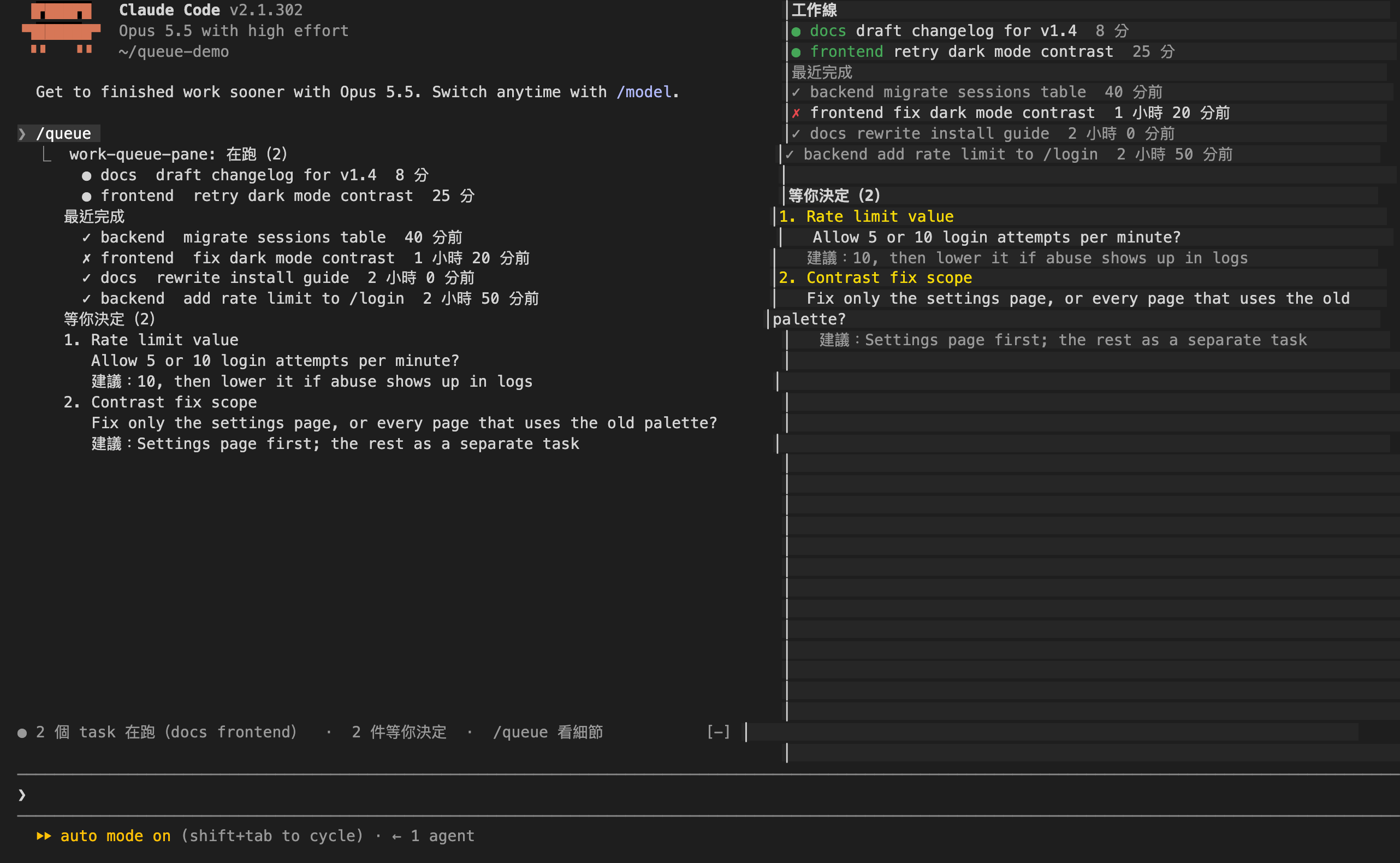
| Pane | Type /queue. It opens beside the transcript. | Running tasks, the 6 latest results, open decisions |
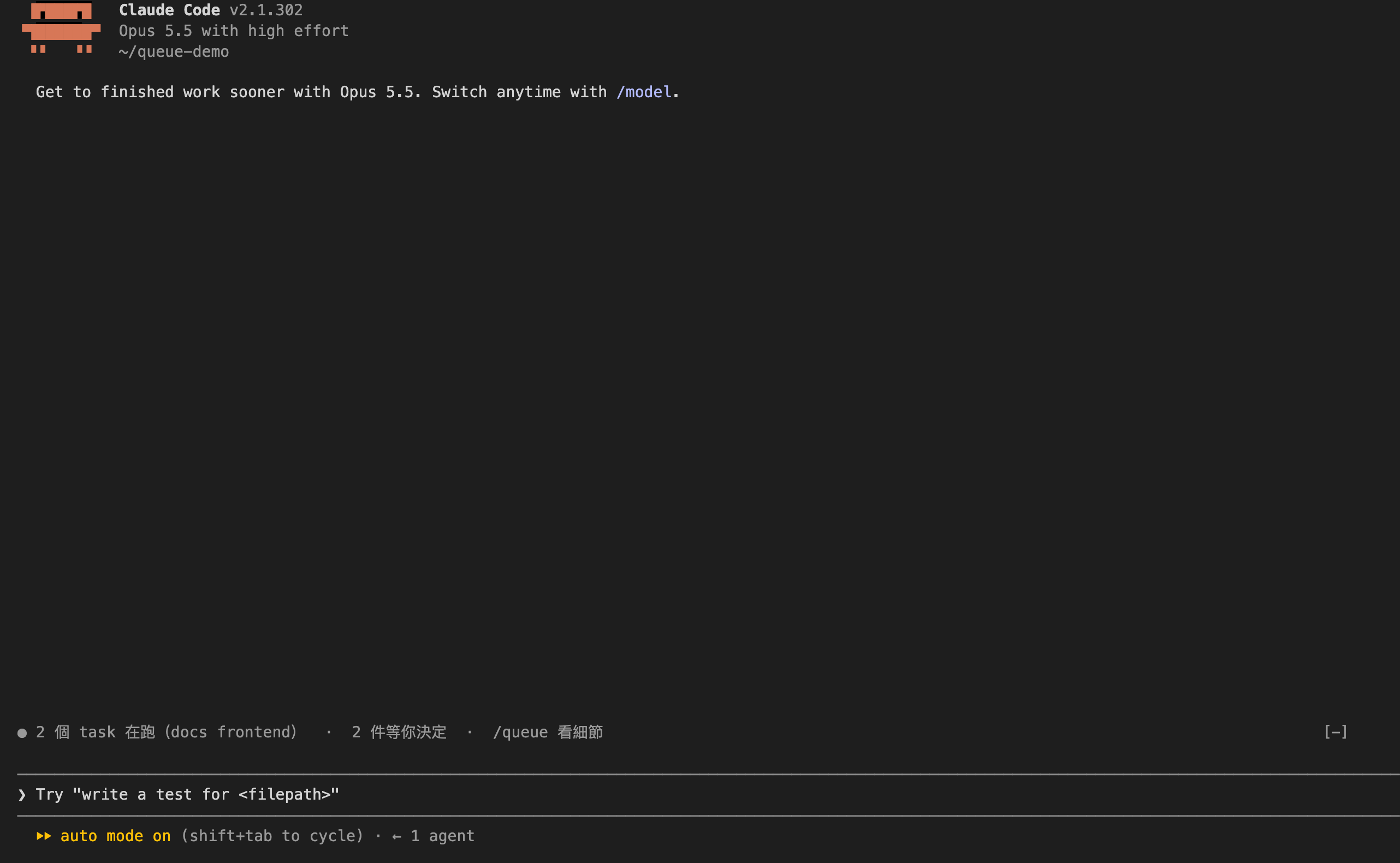
| Line above the prompt (official name: AbovePrompt) | Shows when a task runs or a decision waits | For example: "● 2 個 task 在跑(docs frontend) · 2 件等你決定 · /queue 看細節" |
| /queue command | Opens the pane and returns text | The same content as the pane. claude -p shows this text too. |
| Refresh | Every 15 seconds by default | Re-reads both files and updates the pane |
/queue is a slash command that the mod registers. The docs say a mod command runs a function with no Claude turn.
The mod does not produce data. Your scripts or agents write both files.
Note: in version 0.1.0, the on-screen labels are in Traditional Chinese.
Data format
| Field | Type | Required | Meaning |
|---|---|---|---|
| ev | "start" or "end" | yes | Task started or ended |
| id | string | yes | Same id for a run's start and end |
| lane | string | on start | Lane name, e.g. backend |
| task | string | on start | One-line task description |
| at | string | yes | ISO 8601 time with a time zone |
| error | boolean | no | On end only. true means failed. |
A task with a start and no end counts as running. The mod skips lines that do not parse, such as half-written lines.
Append one line from a shell script:
echo '{"ev":"start","id":"t7","lane":"docs","task":"update FAQ","at":"'"$(date -u +%Y-%m-%dT%H:%M:%SZ)"'"}' >> .work-queue/queue.jsonl| Field | Type | Required | Meaning |
|---|---|---|---|
| id | string | yes | Identifier |
| title | string | yes | One-line title |
| ask | string | yes | The question for you |
| rec | string | no | The asker's recommendation |
| lane | string | no | Which lane asks |
{
  "items": [
    { "id": "d1", "lane": "backend", "title": "Rate limit value",
      "ask": "Allow 5 or 10 login attempts per minute?",
      "rec": "10, then lower it if abuse shows up in logs" }
  ]
}
If a file cannot be read, the pane and /queue name the missing path. The mod does not hide the problem.
You can change the two paths and the interval in /config (the plugin's userConfig): queueFile, decisionsFile, refreshSeconds. Relative paths start from the session's working directory.
How the code works: three key sections
All the code is in one file: hooks/register.tsx, about 200 lines. Here are three sections. Each one shows one idea.
Section 1: register is the entry point where you attach hooks.
export const register: Register = (on, options) => {
  const queueFile = String(options.queueFile ?? '.work-queue/queue.jsonl')
  const decisionsFile = String(options.decisionsFile ?? '.work-queue/decisions.json')
  const refreshMs = Math.max(5, Number(options.refreshSeconds ?? 15)) * 1000

  on('session.start', async ($, e, next) => {
    await $.command.register({
      name: COMMAND,
      description: '打開工作佇列面板:各工作線在跑什麼、等你決定的事',
    })
    await reload($, queueFile, decisionsFile)
    $.clock.every(refreshMs, () => reload($, queueFile, decisionsFile))
    return next(e)
  })
  // ...other hooks
}
Idea: a mod is a set of hooks. Claude Code calls register when it loads the mod.
on(event, handler) attaches one hook. options holds the values the user sets in /config. $ is the API a mod can use; this mod reads files, registers a command, sets a timer, opens a pane and stores state.
next(e) hands the event back to the normal flow. This mod only adds work. It does not change how a session starts.
reload reads both files and stores the results in the mod's own state. My first version put reload inside register, and validate failed. The engine wants functions that take $ at the top level of the file. So the paths now go in as arguments.
Section 2: ui.render Pane draws the data as a pane.
on('ui.render', { component: 'Pane', requestId: PANE }, async ($, e) => {
  const { Box, Text } = $.ui.resolve(e)
  const list = await read($, runs)
  const asks = await read($, decisions)
  const now = await $.clock.now()
  const running = list.filter(r => r.endedAt === null)

  return (
    <Box flexDirection="column">
      <Text bold>工作線</Text>
      {running.map(r => (
        <Text>
          <Text color="green">● {r.lane}</Text> {r.task}
          <Text dimColor>  {ago(r.startedAt, now)}</Text>
        </Text>
      ))}
      {/* ...recent results, open decisions */}
    </Box>
  )
})
Idea: the screen is a hook too. When Claude Code draws a component, it fires a ui.render event.
The second argument is a filter. Here it matches only the Pane with id work-queue. $.ui.resolve(e) returns the components this surface supports, such as Box and Text. The handler returns JSX, and Claude Code draws it.
The line above the prompt uses the same pattern with { component: 'AbovePrompt' }. When there is nothing to show, it returns next(e). The normal screen then appears as usual.
Section 3: command.run handles /queue. It opens the pane when a screen exists and always returns text.
on('command.run', { command: COMMAND }, async $ => {
  await reload($, queueFile, decisionsFile)
  try {
    await $.ui.open({ id: PANE, title: TITLE })
  } catch {
    // 沒有畫面的 session(claude -p、雲端)開不了面板;文字結果照樣回。
  }
  const now = await $.clock.now()
  return { text: summaryText(await read($, runs), await read($, decisions), now, await read($, missing)) }
})
Idea: a command needs a fallback for surfaces without a screen. claude -p and cloud sessions run hooks but draw no pane.
$.ui.open fails where no screen exists, so it sits inside try. The command always returns { text }, pane or not. With a screen, you get the pane and the text. Without one, you still get the text.
(The code comment says: sessions without a screen, such as claude -p or cloud, cannot open the pane; the text result still returns.)
Security: mods are not sandboxed
Bottom line: before you install any mod, run claude plugin validate. Read the hooks: and calls: lines.
A mod runs with your permissions. The docs say it directly: "Mods aren't sandboxed." The docs also say a mod can read API keys in environment variables. It can also auto-approve tool calls.
claude plugin validate does not run the mod. It reads the source. It lists the events the mod hooks and the APIs it calls.
Here is the real output for this mod. I only replaced local absolute paths with relative ones:
Validating plugin manifest: work-queue-pane/.claude-plugin/plugin.json

  ❯ types ./types/index.d.ts declares on $: nothing (no EngineInterface member)
  ❯ types ./types/index.d.ts declares state: work-queue-pane.runs, work-queue-pane.decisions, work-queue-pane.missing

Validating hooks: work-queue-pane/hooks/hooks.json

  ❯ ./register.tsx hooks: session.start, command.run{command=queue}, ui.render{component=Pane, requestId=work-queue}, ui.render{component=AbovePrompt}
  ❯ ./register.tsx gating hook without .catch: command.run{command=queue}
  ❯ ./register.tsx calls: $.clock.every, $.clock.now, $.command.register, $.fs.read (via reload), $.state.get, $.state.set, $.ui.open, $.ui.resolve
  ❯ ./register.tsx state writes: work-queue-pane.decisions, work-queue-pane.missing, work-queue-pane.runs
  ❯ ./register.tsx state reads: work-queue-pane.decisions, work-queue-pane.missing, work-queue-pane.runs

ℹ Advice (does not change the verdict):

  ❯ work-queue-pane/README.md: This README has no line that installs "work-queue-pane" from a marketplace. Add the install line, which works in one step on Claude Code 2.1.275 or later. Validate the folder that holds its marketplace.json to have <owner>/<repo> filled in, and the name its marketplace lists it under.
      /plugin install work-queue-pane --marketplace <owner>/<repo>

✔ Validation passed| Output line | Meaning |
|---|---|
| declares on $: nothing | The mod adds no new API to $ for other mods |
| declares state | It declares three state values of its own: the task list, the decision list and any missing files |
| hooks: | It attaches only four hooks. session.start registers /queue, reads the files and starts the timer; command.run{command=queue} handles /queue only; ui.render Pane and AbovePrompt draw only its own pane and line. The list has no tool event such as tool.call, so the mod cannot block or approve tool calls |
| gating hook without .catch | A notice, not an error. This mod owns /queue, and validate notes the hook has no .catch. The call that can fail, $.ui.open, already sits inside try |
| calls: | The most important line. It lists every API the mod calls. $.fs.read (via reload) is the only file call, and it only reads the two files from your settings. The rest are the timer, command registration, the pane, screen components and its own state. No call writes files, uses the network or runs external programs |
| state writes / state reads | It touches only its own three state values. It does not touch other mods' state |
| Advice | validate suggests a marketplace install line in the README. This does not change the result. This mod ships as a zip for now, so the README has no such line |
If your calls: line lists any other API, someone changed the files. Do not install it.
Check it yourself: from download to screen
You need Claude Code v2.1.287 or later.
1. Download work-queue-pane-0.1.0.zip:
Download work-queue-pane 0.1.0 source and sample data (ZIP)The zip is released under the MIT License. The full text is the LICENSE file inside the zip.
2.Check the hash. The output must equal the value below. If it does not match, stop here:
shasum -a 256 work-queue-pane-0.1.0.zip
# 576144e65fb89ea24372fc73ded52baa2ee460e2ec01d4cc8483fcdfabc62dff
3. Unzip it. The zip has a top-level folder, so you get work-queue-pane/:
unzip work-queue-pane-0.1.0.zip4. Run validate. Compare the output with the previous section:
claude plugin validate ./work-queue-pane5. Make a demo folder with the sample data:
mkdir queue-demo
cp -R work-queue-pane/examples/.work-queue queue-demo/
cd queue-demo
6. Start Claude Code in the demo folder with the mod loaded:
claude --plugin-dir ../work-queue-pane7. Look at the line above the prompt. Type /queue to open the pane.
The sample data has 3 lanes, 2 running tasks and 2 open decisions. The sample times are fixed, so the "running for" values look very large. That is expected.
To use your own data, let your scripts write .work-queue/queue.jsonl and .work-queue/decisions.json. Or point the paths elsewhere in /config.
| Surface | Hooks run | Screen shows |
|---|---|---|
| Terminal claude (incl. editor terminals, JetBrains plugin) | yes | yes, v2.1.287 or later |
| Desktop app, Code tab | yes | yes, except terminal-only components; v2.1.286 or later |
| Desktop app, WSL session | no | no |
| VS Code extension chat panel | yes | extension 2.1.299 or later, and the session must get the feature flag |
| claude -p, Agent SDK | yes | no |
| Cloud session | yes (if the plugin reaches the cloud) | no |
Where no screen shows, use the text from /queue. Run claude -p "/queue" in a folder with .work-queue/. It prints the full text result. The full command is claude -p "/queue" --plugin-dir <mod folder>.
The images in this post come from the terminal Claude Code, run in a pty and redrawn with a terminal emulator. I did not test the desktop app or VS Code.
Limits
The pane shows the latest 30 tasks and the 6 most recent results.
Durations use the local clock. If the writer's clock is wrong, durations are wrong.
In version 0.1.0, on-screen labels are in Traditional Chinese.
Read next
Scheduled scripts usually write queue.jsonl. For the traps of scheduled agents, see the post below. Write "error": true when a task fails, so the pane shows it.
Three pitfalls of scheduled AI agentsSources
- work-queue-pane 0.1.0 source and sample data (ZIP)
- Claude Code docs: Mods overview (definition, surface table, security, validate; read 2026-10-17)
- Claude Code docs: Agent View (labeled research preview; read 2026-10-17)
- Claude Code CHANGELOG (v2.1.287 adds Claude Mods; read 2026-10-17)
- GitHub release v2.1.287 (read 2026-10-17)
- Official blog, "Claude Code mods" (2026-10-01; read 2026-10-17)
- Official mods/ README (Early access notice; read 2026-10-17)