JBoss EAP 01: standalone, domains, and management interfaces
A colleague changed configuration, but requests still show the old behavior. First confirm the same instance: one host can run several JVMs, and the management endpoint may differ from the server receiving HTTP traffic. Start by mapping names to actual targets.
Version note: this series is based on JBoss EAP 8.1. The Red Hat documentation site now lists a newer 8.2 Beta, which is not a GA release. For version differences, see the Red Hat EAP documentation home in the sources.
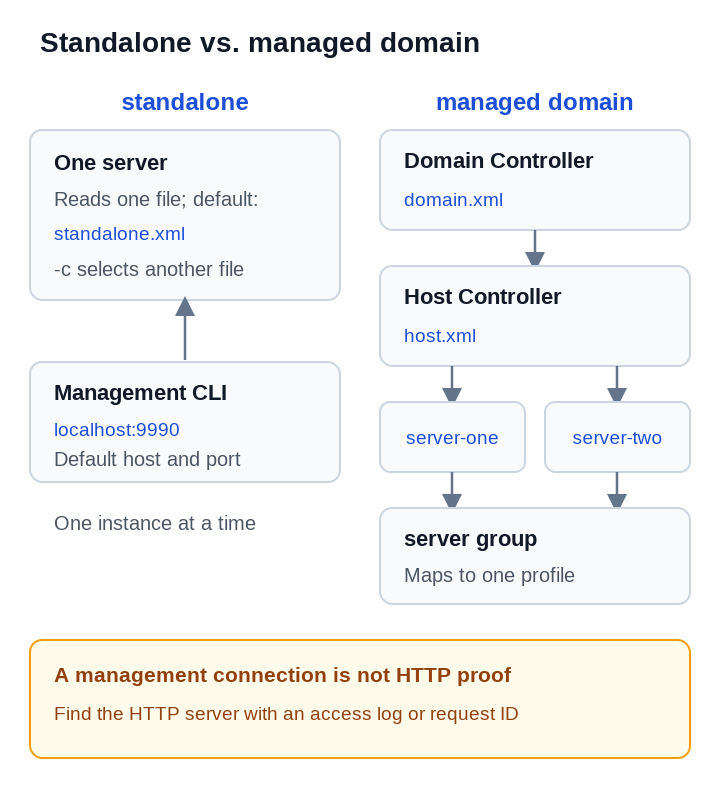
Standalone is a management mode, not a Boot JAR
An EAP standalone instance manages one application server. It can still host WARs and enterprise components. A standalone Boot JAR describes application packaging and startup at a different layer.
The Red Hat EAP 8.1 introduction lists two operating modes. A standalone server is used to “manage instances individually”. A managed domain manages groups of instances “from a single control point”.
| Mode | Default configuration file | Manages | First question |
|---|---|---|---|
| standalone | standalone/configuration/standalone.xml | One instance | Which file did this process actually load? |
| managed domain | domain/configuration/domain.xml and host.xml | A group of instances | Which server group and profile does this server use? |
The paths come from the upstream WildFly 35 Admin Guide, the local stand-in for this series. Check them against the files in your EAP 8.1 installation.
# For your own isolated training installation only.
# Run from the EAP installation directory; not executed for this tutorial.
./bin/standalone.sh -c standalone.xml
This illustrates a training installation, not a universal corporate startup command. RPM services, containers, or service managers may own launch arguments and JDK selection. Find the actual configuration from that entry point. Use managed interfaces for live changes rather than editing XML concurrently with a running server.
Why is the file name not enough? The WildFly 35 Admin Guide says that -c or --server-config selects a different configuration file at startup. These are its two examples.
# Examples from the WildFly 35 Admin Guide, section 3.5.1.
bin/standalone.sh -c=standalone-full.xml
bin/standalone.sh --server-config=standalone-ha.xml
One standalone/configuration directory can hold several XML files. The startup arguments decide which one the process uses. So find the entry point first, note the -c or --server-config value, and then open that file. Without the argument, the default file is standalone.xml.
Domains centralize management; servers execute applications
Domain controller / domain model
  → host controller
    → server A ─┐
    → server B ─┴→ server-group → profile + socket-binding group

Application requests execute on the server JVMs.
domain.xml holds shared configuration; host.xml describes host-level roles and servers. Server groups associate servers with profiles, deployments, and network configuration. An EAP profile groups subsystem settings and is unrelated to a Spring profile. Domain management alone does not establish load balancing or session replication.
| Term | Official wording (excerpt) | Plain meaning |
|---|---|---|
| domain.xml | must be located in the domain/configuration directory of an installation that's meant to run the Domain Controller | Lives in the installation that acts as Domain Controller |
| host.xml | contains configuration information that is specific to the particular host | Settings for this host only |
| server group | set of server instances that will be managed and configured as one | Servers managed and configured together |
| profile | a named set of subsystem configurations | A named group of subsystem settings |
These four definitions answer the first question when a change “did not take effect”. Which profile was changed? Does this server’s server group use that same profile? If the answers differ, the change never reaches this server.
Separate management from application HTTP
# Example local management address; use the actual authorized listener.
./bin/jboss-cli.sh --connect --controller=127.0.0.1:9990

# In the connected CLI, for a standalone training server:
version
:read-children-names(child-type=subsystem)
deployment info
The WildFly 35 Admin Guide says the CLI connects to localhost:9990 by default. The EAP 8.1 Configuration Guide places the management console and HTTP API on 9990. Check the EAP 8.1 CLI default in your own environment. You only need to give the port when the server listens on another one. Production may use a different port, TLS, or a proxy, so ask for the real address first. After connecting, run version first to confirm the product and version.
Check version information and deployment state. Permission failures, missing resources, and successful empty results are different. In a managed domain, shared configuration is under /profile=NAME. Per-server runtime is under /host=NAME/server=NAME. A standalone root address cannot simply stand in for them.
A successful management connection only proves that you reached the management interface. Confirm which server received the HTTP request with an access log or a request ID. Record both in the workbook before you claim to know your target.
Exercise: inspect declarations without EAP
python3 inventory.py fixtures/standalone.synthetic.xmlRun this inside the kit. Find OrdersDS, AuditXA, mq-jakarta, and orders.war. The HTTP port remains ${jboss.http.port:8080}: the tool does not resolve properties, offsets, or listener state. This exercises XML reading, not an EAP-valid configuration or successful startup.
Check yourself, then compare
Does a default-looking 8080 declaration establish the listening port? No: configuration selection, expressions, offsets, and runtime remain unverified. Record the mode, host, server, group, and profile in the workbook. Distinguish not applicable from unknown.
Follow-up: in a managed domain, a colleague changed the profile named full, but server-two did not change. What do you check first? Answer: find the server group of server-two, then the profile of that group. Only when both lead to full should you inspect the setting itself.
Download the EAP offline kit: inventory, exercises, workbookNext: 02: WAR/EAR and deployment