JBoss EAP 03: JARs, module visibility, and Jakarta migration
Maven builds successfully, but EAP reports ClassNotFoundException. Compilation proves what the compiler could see then. Runtime resolution depends on the loader responsible for the component. These are related questions, not identical dependency lists.
Version note: this series is based on JBoss EAP 8.1. The Red Hat documentation site now lists a newer 8.2 Beta, which is not a GA release. For version differences, see the Red Hat EAP documentation home in the sources.
Compare three inventories
| Inventory | Inspect | Does not establish |
|---|---|---|
| Maven tree | Versions, scopes, transitive dependencies | Same version will load in EAP |
| WAR/EAR contents | Actually packaged JARs and classes | Visibility from every module |
| EAP modules and deployment dependencies | Container providers and visibility | Every application path was tested |
# Use your project checkout and an already built artifact.
mvn dependency:tree
jar tf orders.war
Maven may resolve plugins or download dependencies; use existing build records and artifacts when offline. EAP has modular loading rules, with distinctions between EAR subdeployments and WAR isolation. Deployment structure descriptors can change dependencies, but blanket exclusion templates hide the ownership problem.
Deployments become modules: learn to read module names
The EAP 8.1 class loading guide says each WAR or JAR deployment becomes a dynamic module named “deployment.” plus the deployment name. For example, inventory.war becomes deployment.inventory.war. EAR subdeployments add one level: reports.war inside accounts.ear becomes deployment.accounts.ear.reports.war. When debugging, change “which deployment cannot find the class” into “which module’s class loader cannot find it.” The question becomes concrete.
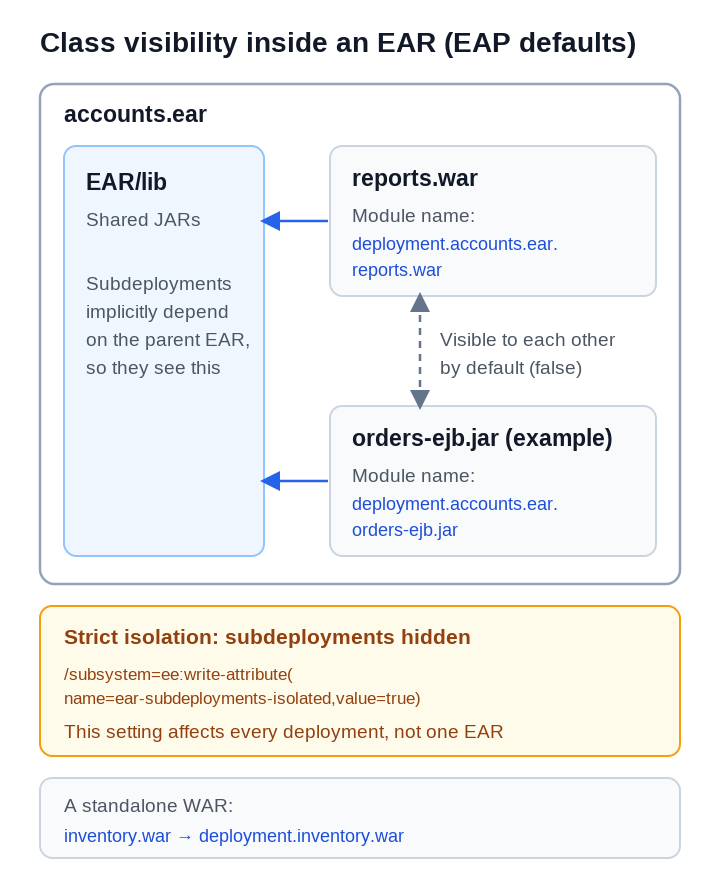
The guide also states that each EAR subdeployment has its own class loader and an implicit dependency on the parent module (the EAR itself), so it sees the classes in EAR/lib. By default, a subdeployment can also access resources of other subdeployments in the same EAR. So when one class sits in both EAR/lib and a WAR, first ask which module loads it.
# Strict isolation for EAR subdeployments. Training server only.
/subsystem=ee:write-attribute(name=ear-subdeployments-isolated,value=true)
This attribute defaults to false. The guide warns that setting it to true affects every deployment on the server, not just this EAR. It is not a shortcut for one ClassNotFoundException. Before changing it, list the affected applications, record the current value, and compare results on a training server.
Conversely, if two subdeployments should share one library, one place you can put it is EAR/lib. The guide says subdeployments “always” have an implicit dependency on the parent module (the EAR itself), so they see the classes in EAR/lib.
The namespace change is selective
Migrated enterprise APIs include servlet, persistence, and messaging packages. Java SE packages such as javax.sql, javax.naming, and javax.crypto remain. XML schemas, reflective class names, service registrations, and third-party libraries can also reference old types. Import changes alone do not complete the migration.
A javax.jms type is distinct from its jakarta.jms counterpart. If an application and adapter use different namespaces, identify the API across the entire path before choosing artifacts. Adding both APIs does not bridge their types.
The IBM MQ client is a concrete case. IBM ships a separate set of classes for Jakarta Messaging, and the package names change with it. The table below copies the mapping from the IBM MQ 9.4 documentation.
| IBM MQ classes for JMS | IBM MQ classes for Jakarta Messaging |
|---|---|
| com.ibm.mq.jms[.*] | com.ibm.mq.jakarta.jms[.*] |
| com.ibm.jms | com.ibm.jakarta.jms |
| com.ibm.msg.client.jms.* | com.ibm.msg.client.jakarta.jms.* |
| com.ibm.msg.client.wmq.* | com.ibm.msg.client.jakarta.wmq.* |
The IBM page also says the two offerings are interoperable but must not coexist in a single application. So when the application moves to jakarta.jms, the MQ client must move to the Jakarta version too; do not put both in the WAR and hope. Packages for common services such as trace and logging are the same in both and need no rename.
Assign each dependency an owner
| Resource | Ownership question |
|---|---|
| Servlet/Jakarta API | Are compile APIs separate from container implementations? |
| Spring | Which versions travel with the application? |
| Hibernate/JPA | Container provider or a documented application-provider setup? |
| JDBC driver | Server-managed or application-created, and for which data source? |
Exercise: two versions of one class
Suppose a WAR packages a new library version while a server module supplies an older one. NoSuchMethodError when calling a new method calls for inspecting the loaded version and caller expectations, not adding a third JAR. For ClassNotFoundException, identify the failing loader. Gather artifact contents, effective dependency settings, and the cause chain; then adjust ownership and exercise the affected path.
Follow-up: accounts.ear has library A 1.0 in EAR/lib, and reports.war has library A 2.0 in WEB-INF/lib. Do not delete files yet. Collect evidence in three steps.
# 1. Name the loading module, e.g. deployment.accounts.ear.reports.war
# 2. Read (do not write) the current isolation setting:
/subsystem=ee:read-attribute(name=ear-subdeployments-isolated)
# 3. List where each copy of library A sits:
jar tf accounts.ear
jar tf reports.war
With evidence from all three steps, decide which copy stays and who provides it. Then rerun the case that calls the new method, and attach the module name, setting value, and both listings to the workbook. “Just delete the old JAR” brings the same problem back at the next upgrade.
Download the EAP offline kit: inventory, exercises, workbookNext: 04: JNDI, data sources, transactions