JBoss EAP 04: JNDI, data sources, and transaction boundaries
The application cannot find OrdersDS, while an administrator sees that pool. They may be referring to different names: the management model identifies a pool, while the application looks up a JNDI binding. Establish the mapping before investigating connections and transactions.
Version note: this series is based on JBoss EAP 8.1. The Red Hat documentation site now lists a newer 8.2 Beta, which is not a GA release. For version differences, see the Red Hat EAP documentation home in the sources.
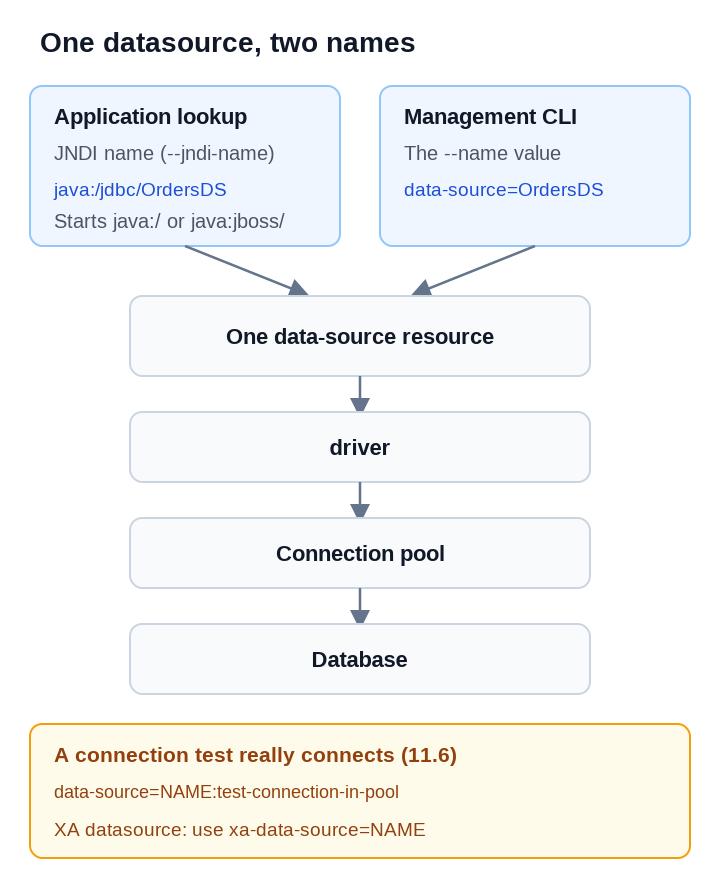
Trace the name to a connection pool
Application lookup: java:/jdbc/OrdersDS
  → EAP data-source resource: OrdersDS
    → driver reference
      → connection pool → database

Names are illustrative, not target-system configuration.
DataSource exposes connection acquisition; the pool manages connection lifecycle. JNDI names resources rather than databases. A driver reference does not establish a JDBC artifact version: inspect the artifact and supported combination separately. DataSource remains javax.sql.DataSource on Java 21.
Let Boot look up an existing resource
# Illustrative application configuration for an EAP-hosted WAR.
spring.datasource.jndi-name=java:/jdbc/OrdersDS
This requests an existing JNDI datasource. Custom beans, auto-configuration conditions, and deployment determine whether it takes effect. It neither creates the server resource nor proves correct transaction-manager wiring. If application code also creates a pool, inspect which bean is actually injected.
# Authorized standalone CLI; replace with a name discovered in the model.
/subsystem=datasources/data-source=OrdersDS:read-attribute(name=jndi-name)
Reading the attribute observes configuration. The separate test-connection-in-pool operation actively acquires or tests a database connection and is excluded from the kit’s observation list. Success still does not establish application SQL, schema access, isolation, or rollback behavior.
Official command: the two names are two arguments
Section 11.3.1 of the EAP 8.1 datasource guide creates a non-XA datasource with data-source add. This is the printed format; replace the uppercase values.
# Format from the EAP 8.1 datasource guide, section 11.3.1.
# Do not paste real passwords into tickets or shared notes.
data-source add --name=DATASOURCE_NAME --jndi-name=JNDI_NAME --driver-name=DRIVER_NAME --connection-url=CONNECTION_URL --user-name=USER_NAME --password=PASSWORD
--name and --jndi-name are separate arguments, so the two names can differ. The test path in section 11.6 is data-source=DATASOURCE_NAME, which uses the --name value. The guide also says a JNDI name must start with java:/ or java:jboss/, for example java:jboss/datasources/ExampleDS.
| Argument | Value here | Used by |
|---|---|---|
| --name | OrdersDS | Management CLI path data-source=OrdersDS |
| --jndi-name | java:/jdbc/OrdersDS | Application lookup, spring.datasource.jndi-name |
The JNDI name here starts with java:/, so it follows the rule. If a name has neither prefix, fix the name before you investigate connections. In the workbook, give each name its own cell. If both share one “OrdersDS” cell, you cannot see which side is wrong.
Section 11.1 also says that EAP ships an example datasource, ExampleDS, to show how datasources are defined. The guide also says that ExampleDS and the H2 database should not be used in production. Seeing ExampleDS in the configuration does not mean the application uses it. Compare the exact JNDI name that the application looks up.
Testing a connection: XA datasources use another path
# From the EAP 8.1 datasource guide, section 11.6.
/subsystem=datasources/data-source=DATASOURCE_NAME:test-connection-in-pool

# For an XA datasource, the guide says to replace the path segment:
/subsystem=datasources/xa-data-source=XA_DATASOURCE_NAME:test-connection-in-pool
The guide says: to test an XA datasource, replace data-source= with xa-data-source=. AuditXA in this series is an XA datasource, so its path is xa-data-source=AuditXA. This command really connects to the database; run it only in an authorized training environment.
What JTA and XA each address
JTA supplies transaction-management APIs and coordination; XA is a protocol for participating resources. An XA datasource declaration does not prove DB and MQ share one transaction. Five more things matter. They are the transaction manager, adapter capabilities, enlistment, recovery settings, and the executed path. Also verify which manager Spring selects and whether transactional interception applies.
Start with the business contract: must the database write and message publication commit atomically? If so, test commit, rollback, and recovery. If the existing system uses an outbox or compensation, validate that contract. Changing transaction architecture during migration makes differences harder to attribute.
For XA recovery, section 11.8 of the datasource guide is explicit. XA recovery ensures that all affected resources are updated or rolled back, even if a resource crashes. The guide says “XA recovery happens without user intervention”. EAP registers recovery modules for JDBC XA resources automatically.
That section covers JDBC XA resources only. For recovery on the MQ side, read the resource adapter documentation. Automatic registration also does not mean your failure case has been tested. Force the failure in a training environment and check both sides.
Exercise: an omitted enabled attribute
The inventory reports enabled_declared: null for AuditXA. This means the file omits the attribute, not false or runtime availability. Design a failure after a DB write but before MQ completion. Derive expected database state, redelivery, and correlation evidence from the existing contract. Leave actual results pending until an environment runs the case.
Follow-up: an administrator says test-connection-in-pool succeeded, but the application cannot find java:/jdbc/OrdersDS. Where do you look first? Answer: read jndi-name with read-attribute and compare it with the application setting, character by character. A working connection only proves the pool side. If the names differ, the lookup still fails.
Download the EAP offline kit: inventory, exercises, workbookNext: 05: MDB, adapters, IBM MQ