JBoss EAP 06: diagnose the right layer and verify migration parity
A migration can produce a burst of errors at once. Treating each line as an independent problem creates unnecessary work. Find the first attributable failure and its cause chain, identify the responsible layer, and check whether later unavailable services are consequences.
Version note: this series is based on JBoss EAP 8.1. The Red Hat documentation site now lists a newer 8.2 Beta, which is not a GA release. For version differences, see the Red Hat EAP documentation home in the sources.
Classify before choosing the next observation
| Symptom | First evidence to inspect |
|---|---|
| JVM does not start | Actual JDK, arguments, process output |
| Deployment fails | Artifact hash, deployment state, first cause |
| Class or method missing | Packaged versions, visibility, provider |
| JNDI lookup fails | Instance, resource name, binding, scope |
| MDB does not process messages | Adapter/MDB state, destination, selector, connectivity |
| 401/403 or changed login | Proxy, Elytron/application security, Spring filters |
Management login does not establish application-user authentication. Spring Security and EAP security may act at different stages. Use correlation identifiers and a time window to narrow logs. Review sensitive data before sharing: the XML inventory is not a general anonymization tool.
From 6.4 to 8.1: inventory, then separate changes
This move crosses JDK, enterprise APIs, Spring, Hibernate, MQ, and build tooling. Inventory WARs, EARs, MDBs, and standalone batches separately, with entry points, providers, resources, and baseline cases. Do not overwrite a new installation with old XML. Check removed or changed subsystems and the source-version scope of each migration instruction.
Reduce each verification step to a module or responsibility, such as packaging and loading before data access. This is a work-planning method, not a claim that every intermediate combination is supported for production. Check the target matrix and applicable migration steps separately.
The documented path: 6.4 cannot jump straight to 8.1
Chapter 1 of the EAP 8.1 migration guide states that it covers upgrades from EAP 7 and 8.0 to 8.1. The 6.4 path is in a note in §3.2.1. The note says: “If you want to migrate from JBoss EAP 6.4, you must first migrate to the latest Cumulative Patch (CP) version of JBoss EAP 7.4.” The same note goes on to say that you then migrate from that 7.4 CP to 8.1. The note also points to the JBoss EAP 7.4 Migration Guide. A 6.4 upgrade therefore has two legs, each with its own migration guide.
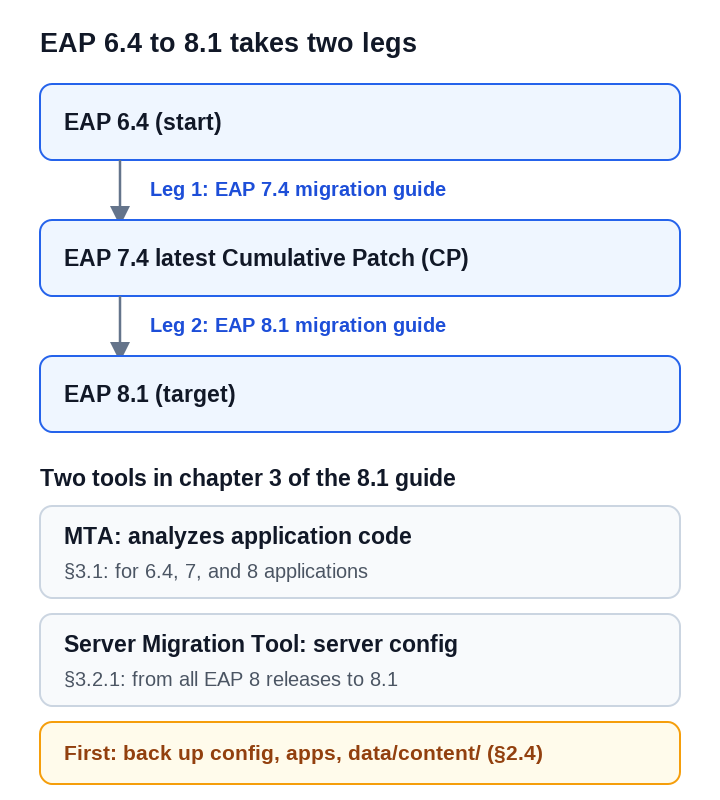
| Tool | Handles | Excerpt |
|---|---|---|
| Migration Toolkit for Applications (MTA) | Application code and architecture | §3.1: analyze the code and architecture of your JBoss EAP 6.4, 7, and 8 applications |
| JBoss Server Migration Tool | Server configuration files | §3.2: reads your existing JBoss EAP server configuration files and adds configurations for any new subsystems |
The two tools cover different targets. MTA reports map to the “class or method missing” row of the symptom table. The Server Migration Tool maps to subsystem and resource configuration. This mapping is a reading of the two sentences, not an official classification. §3.2.1 also states that the Server Migration Tool supports migration from all EAP 8 releases to 8.1. For the 6.4 leg, check the 7.4 migration guide for tooling.
The guide also covers the first step. §2.4 says: “Make sure to back up the current server configuration and applications before you start the migration.” The same section asks for a backup of deployments under data/content/. Keeping the original state gives the later behavior comparison its baseline.
One case, four evidence surfaces
Case: ORDER-FAIL-02 (synthetic planning example)
Input: fixed payload + business key
Baseline: isolated old-system data and queue state
Target: equivalent isolated new-system state
Observe: HTTP + DB + MQ + correlated logs
Completion: explicit asynchronous completion condition + timeout
Result: match / mismatch / missing evidence
Establish equivalent isolated data and test queues rather than replaying into production. Compare HTTP status, headers, and body; relevant DB changes; message contents, destinations, counts, and completion; and required log events and errors. Timestamps, generated IDs, or updated wording may differ. Define justified normalization rules in advance and retain raw evidence.
A log baseline can start from the official example. §6.1.1.1 of the EAP 8.1 configuration guide covers CLI deployment to a standalone server. A successful deployment prints nothing to the CLI. The server log shows deployment messages such as these:
WFLYSRV0027: Starting deployment of "test-application.war" (runtime-name: "test-application.war")
WFLYUT0021: Registered web context: /test-application
WFLYSRV0010: Deployed "test-application.war" (runtime-name : "test-application.war")
Deploy once before and once after the upgrade. Check that all three codes appear and that the web context path matches. Treat the codes and the path as comparison keys and the remaining wording as reference only. That is this lesson’s normalization rule, not an official one. If WFLYUT0021 is missing, return to the “deployment fails” row of the symptom table.
Asynchronous work needs an explicit completion condition, observation window, and timeout. Missing MQ evidence is incomplete, or a failure under predefined criteria, rather than success after a short sleep. Include rollback, redelivery, duplicate inputs, and recovery alongside happy paths.
Exercise: HTTP 200, correct DB, missing MQ evidence
Can this pass migration acceptance? Not when messaging belongs to the contract. Mark the evidence gap and inspect publication, transaction completion, destination, and consumption. The workbook provides those fields. Complete one normal and one failing case to produce an explainable result beyond a successful build.
Review Boot testing and deployment boundariesReturn to the enterprise migration overviewDownload the EAP offline kit: inventory, exercises, workbookPractical lesson 07: run the migration comparison lab