JBoss EAP 05: MDBs, resource adapters, and IBM MQ delivery
An HTTP caller waits for a response; an MDB is triggered by container-managed message delivery. If processing updates a database and then fails, rollback and redelivery may follow. Explaining the outcome requires delivery and transaction ownership, not just the body of onMessage.
Version note: this series is based on JBoss EAP 8.1. The Red Hat documentation site now lists a newer 8.2 Beta, which is not a GA release. For version differences, see the Red Hat EAP documentation home in the sources.
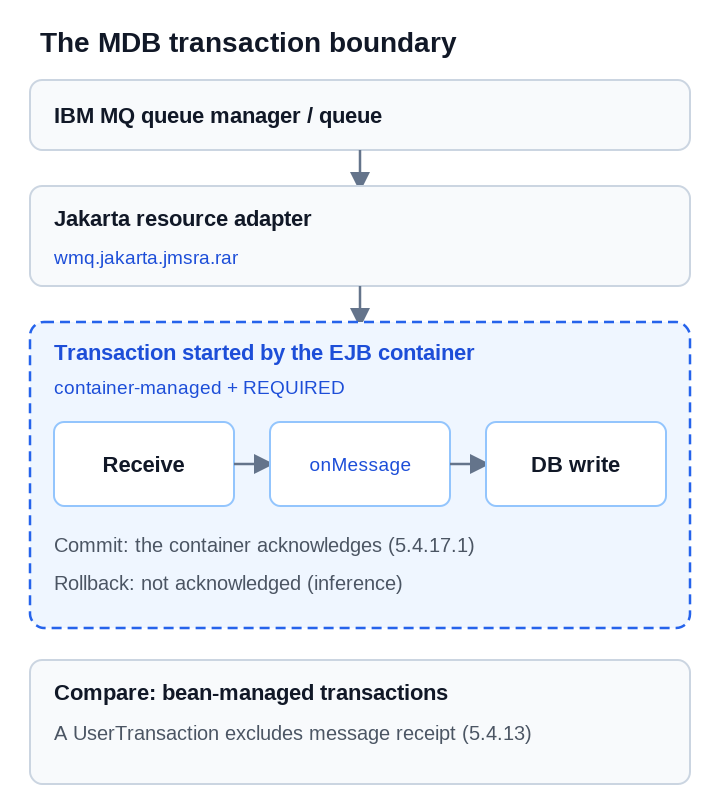
Draw the complete delivery path
IBM MQ queue manager / queue
  → IBM MQ Jakarta resource adapter (RAR)
    → EAP EJB container → MDB.onMessage
      → business service → database

Transaction participation must be verified for each resource.
An MDB belongs to the EJB container; a Spring service belongs to Spring. Both support injection, but their lifecycles do not automatically merge. Identify how a called service is created and how transaction context crosses that boundary. Replacing an MDB with @JmsListener changes ownership and deserves a separate architecture decision.
Record three distinct version fields
Client libraries expose MQ APIs; the resource adapter (RAR) integrates with the application server. IBM distributes wmq.jmsra.rar and wmq.jakarta.jmsra.rar for different API namespaces. Check the Jakarta adapter for this EAP 8.1 path. For example, a client version of 9.4.5.1 alone does not tell you the adapter version. It also does not tell you the remote queue-manager version or support status.
| RAR file | API | Servers IBM lists |
|---|---|---|
| wmq.jmsra.rar | JMS 2.0 | Java EE 7 or Java EE 8 |
| wmq.jakarta.jmsra.rar | Jakarta Messaging 3.0 | Jakarta EE 9.1 (or later) |
EAP 8.1 is Jakarta EE 10, so it matches the second row. Both files come from the same places. After you install the IBM MQ Java messaging component, they are in MQ_INSTALLATION_PATH/java/lib/jca on AIX and Linux. You can also download them separately from IBM Fix Central.
During inventory, copy the deployed RAR file name into the workbook. If it is wmq.jmsra.rar, the JMS 2.0 adapter is installed, which does not match the Jakarta path. Another IBM page says the JMS and Jakarta Messaging MQ classes are interoperable but must not coexist in a single application. Lesson 03 has a package-name table.
Record adapter archive, connection factory, destination binding, physical queue, selector, concurrency, and transaction mode. Activation properties vary by adapter; examples for EAP’s integrated broker are not interchangeable with IBM MQ configuration. The kit contains a synthetic adapter declaration, not deployable MQ connectivity.
Method completion is part of a container transaction
For a container-managed MDB message listener, Jakarta Enterprise Beans permits REQUIRED or NOT_SUPPORTED transaction attributes. These are specification options. To find the effective choice, inspect annotations, descriptors, resources, and runtime. Check the same sources to see whether DB and MQ join one transaction.
The same section has another rule. If an MDB uses bean-managed transactions and calls UserTransaction itself, the message receipt that invokes it is not part of the transaction. For message receipt to be part of the transaction, use container-managed transactions with REQUIRED.
Section 5.4.17.1 covers acknowledgment: the container handles message acknowledgment automatically. With container-managed transactions, acknowledgment is part of the transaction commit.
| Demarcation | Receipt in the transaction? | When the message is acknowledged |
|---|---|---|
| container-managed + REQUIRED | Yes (5.4.13) | At transaction commit (5.4.17.1) |
| bean-managed (UserTransaction) | No (5.4.13) | Handled by the container (5.4.17.1) |
An inference from this: with the first row’s setup, a rollback means the message is not acknowledged. Whether it is delivered again, the redelivery count, and where it ends up is not decided by the specification for IBM MQ. Check the adapter and queue configuration.
Section 8.6.5.2 covers REQUIRED message listener methods and has two key sentences. “The transaction is committed when the onMessage method has completed.” “If the onMessage method does not successfully complete or the transaction is rolled back, message redelivery semantics apply.”
| How it ends | Transaction | Source |
|---|---|---|
| Returns normally | Committed | 8.6.5.2 |
| Throws a system exception | Container-started transaction rolled back, instance discarded, EJBException wrapping the original sent to the adapter | 9.3.4, Table 12 |
| Calls setRollbackOnly, then returns | Rolled back, not committed, when the method completes | 8.6.5.3 |
So the workbook needs at least three cells: RAR file name, transaction demarcation, and transaction attribute. Only with all three can you predict whether a failed message comes back. If one is missing, write “unknown” as the expectation.
The specification does not describe the “after catch” case directly. An inference from the table: if you catch an exception, log it, and return normally, the method has completed. The transaction commits. The message is not redelivered for that reason. To roll back, let a system exception propagate or call setRollbackOnly. Rollback can lead to another delivery of the same business event. Do not assume a single delivery. Verify redelivery thresholds, backout/error queues, and recovery against adapter, queue, and application configuration.
Exercise: fail after the database write
| Surface | Record |
|---|---|
| DB | Original state, changes, final transaction outcome |
| MQ | Message identity, business key, delivery/error outcome |
| Logs | Case correlation, exception, transaction outcome |
| Retry | Whether the same event creates a duplicate side effect |
The answer is not always rollback. Derive expectations from the verified transaction model: one effective XA transaction and two independent commits can fail differently. Evaluate duplicates with the business key and established contract, not only one MQ message ID. Preserve the failure point and all evidence; this tutorial has not executed an enterprise MQ integration test.
Download the EAP offline kit: inventory, exercises, workbookNext: 06: Debugging and migration evidencePractice: lesson 10 transaction and redelivery modelSources
- IBM MQ resource adapters
- Jakarta Enterprise Beans 4.0, sections 5.4.13, 5.4.17.1, 8.6.5.2, 8.6.5.3, and 9.3.4 (MDB transactions, acknowledgment, exceptions)
- IBM MQ 9.4: classes for Jakarta Messaging overview (interoperable, must not coexist)
- EAP 8.1 introduction (Jakarta EE 10)
- EAP migration: IBM MQ integration
- Red Hat JBoss EAP documentation home (version list, incl. 8.2 Beta)